

Plan, manage and monitor projects with a single click
Visual Planning® supports companies in the centralised planning, management and monitoring of projects, and clearly displays tasks, deadlines, staff, materials and other resources in a graphical planning board. Project managers can see workload and current project progress at a glance and can flexibly reallocate resources and tasks in the event of changes.
How you can optimise your project workflows
In many companies, project planning is one of the most important organisational tasks. Deadlines, tasks, staff, machinery, materials and other resources must be coordinated.
As soon as several projects are running in parallel, dependencies, competing resource requirements and differing priorities quickly arise.
Visual Planning® brings together projects, tasks, deadlines, responsibilities and required resources in a centralised and customisable digital planning board.
This gives project managers a centralised overview of ongoing projects, planned work packages, available capacity and potential scheduling conflicts.
Depending on the configuration, changes can be made via drag-and-drop and displayed in the relevant planning views.

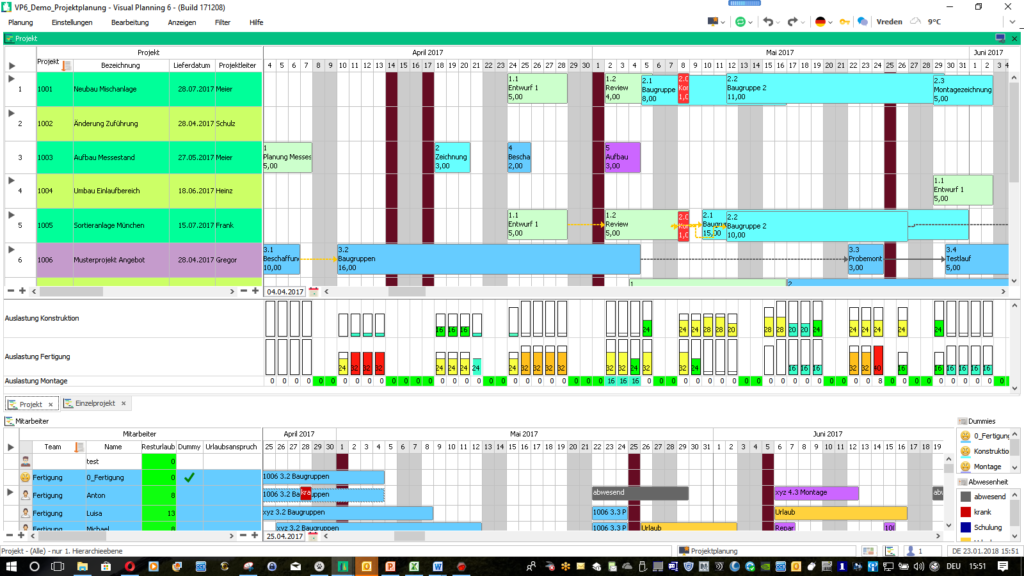
Presenting complex projects clearly
Even long-term and large-scale projects can be displayed in various time-based, organisational and resource-related views.
Project phases, work packages, deadlines and milestones can be linked to the relevant staff, machinery or other resources.
Depending on the planning concept in place, project managers can switch between overviews, detailed views, capacity displays and custom filters.
This makes relationships and dependencies clearer than in separate tables or files.
Visual Planning® does not replace specialist project management. However, the software provides the necessary planning information in a centralised and traceable manner.
Features for digital project planning
The functions used depend on the project structure, the available data and the specific configuration of Visual Planning®.
Project Overview
Projects, phases, tasks, deadlines and responsibilities are displayed in a central planning overview.
Task planning
Work packages and tasks can be assigned to employees, teams, projects and time periods.
Resource planning
Staff, machinery, vehicles, rooms and other resources can be planned together with their availability.
Scheduling
Project dates, start and end dates, and defined milestones can be clearly displayed.
Capacity Overview
Planned workloads and available capacity can be analysed for staff, teams and other resources .
Flexible rescheduling
Depending on the configuration, tasks and appointments can be moved using drag-and-drop or assigned to other resources.
Planning rules
Rules and warnings may indicate double bookings, missing availability or invalid assignments .
Reports
Project status, capacity utilisation and other planning data can be displayed in customisable views and reports.
Interfaces
Project, order, staff and resource data can be imported from existing systems depending on the project.
Configure projects flexibly and to suit individual needs
Visual Planning® can be adapted to different types of projects, organisational structures and workflows.
Fields, status indicators, views, colours, filters and user rights are configured in accordance with the requirements of the respective company.
Staff, materials, machinery and other resources can be allocated to work packages or project phases.
The workload overview helps project managers to identify existing workloads and available capacity.
The number of users working simultaneously depends on the licensing model and system environment used. Unlimited use cannot therefore be assumed as a general rule .
Email notifications and other alerts can be set up depending on the configuration and any additional services used .
Distinguishing between project planning and project management
Project planning defines which tasks, deadlines, resources and processes are allocated to a project.
Project management supports the ongoing implementation. In doing so, status, progress and any deviations are taken into account.
Visual Planning® can display planned and current information in joint or separate views.
This provides project managers with a basis for assessing changes and adjusting further planning.
Present project progress in a clear and transparent manner
Tasks can be linked to status details, deadlines, responsibilities and other project information .
Progress, feedback and completed work packages can be recorded depending on the process that has been established.
Reports and filtered views can help project managers to identify delays and outstanding tasks at an early stage.
The quality of the analyses depends on the timeliness and completeness of the data that has been maintained or imported .
Coordinate several projects simultaneously
In multi-project management, different projects often compete for the same staff, machinery or financial and organisational resources.
Visual Planning® can display multiple projects in a single overview and show the respective resource allocations.
Priorities, project types, statuses and organisational units can be used as filter or grouping criteria.
This makes it possible to identify potential conflicts during the planning stage. The decision on priorities and the reallocation of resources remains with the relevant project managers.
Plan resources and capacities across projects
Staff and other resources can be allocated to multiple projects. Their current bookings and availability are displayed in the respective views .
Capacity utilisation reports can help to identify overloads or unused capacity.
Further information can be found at Resource planning and Pool Resource Planning .
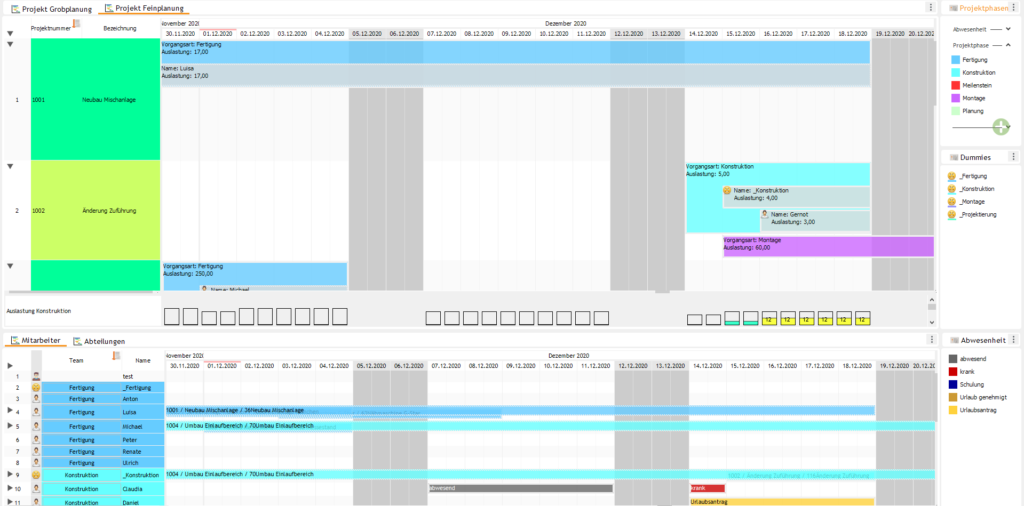
Centrally update project documentation
Depending on the configuration, tasks and appointments can be supplemented with descriptions, status details, responsibilities and additional information.
Documents, references or further project information can be stored with the relevant planning elements in accordance with the established process.
This ensures that planning-related information is displayed directly in the context of the respective tasks and project phases .
However, Visual Planning® is not a substitute for a specialised document management system. For complex document workflows, integration with existing systems may be advisable.
Frequently asked questions about digital project planning
What is meant by digital project planning?
Digital project planning refers to the centralised planning and coordination of projects, tasks, deadlines, staff, resources and capacities using software.
What tasks does project planning involve?
These include, amongst other things, task planning, scheduling, resource planning, capacity planning, team coordination and the visualisation of project phases and milestones.
Why is digital project planning important?
It provides a centralised overview of projects, tasks, deadlines and required resources. Changes, bottlenecks and potential overlaps thus become apparent more quickly.
How does digital project planning work?
Projects are linked to a digital planning board containing tasks, deadlines, staff and other resources. Authorised users can edit the schedule centrally.
What are the benefits of digital project planning?
It improves transparency regarding project deadlines, responsibilities, tasks and capacities. Last-minute changes can be incorporated centrally into the planning.
Why is Excel often not sufficient for complex project planning?
With numerous projects, tasks and resources, different table entries can quickly arise. Dependencies, overlaps and changes must be updated manually .
What are the disadvantages of project planning using Excel?
Changes often have to be made across several files . This can lead to version conflicts, data transfer errors and incomplete planning information.
How can projects be planned clearly?
Projects can be displayed alongside phases, tasks, deadlines, responsibilities and required resources in graphical views.
How can capacity bottlenecks be identified at an early stage?
Utilisation and capacity views compare existing bookings with available time slots. This makes potential bottlenecks visible as early as the planning stage.
How does digital project planning support resource planning?
Staff, machinery, vehicles and other resources can be allocated to projects, tasks and time periods. Existing bookings are visible during further planning.
How do you plan several projects at the same time?
Multiple projects can be displayed in shared or separate views and planned in parallel with regard to deadlines, priorities, resources and capacities.
How does digital project planning help with last-minute changes?
Changes to deadlines, new requirements or resource unavailability can be entered centrally and taken into account in subsequent planning.
How does digital project planning improve collaboration?
Authorised users work on the basis of a shared planning status. Tasks, deadlines and resource allocations are thus centrally traceable.
Does digital project planning automatically reduce delays?
Clear project and capacity overviews can help to identify delays and bottlenecks at an earlier stage. However, this does not automatically prevent deadlines from being missed.
How does project planning support task coordination?
Tasks can be planned, prioritised and assigned to employees or teams. Status, deadlines and changes can be displayed centrally, depending on the configuration.
What is the difference between project planning and project management?
Project planning defines planned tasks, deadlines, resources and processes. Project management oversees the implementation and takes into account status, deviations and necessary adjustments.
How does digital project planning support multi-project management?
Multiple projects can be viewed together and coordinated in terms of resources, capacities, deadlines and priorities .
Can digital project planning be used on mobile devices?
Depending on the licence, configuration and system environment, shared planning information can be made available in a browser or on suitable mobile devices.
What are the benefits of hosted project planning?
A hosted solution provides Visual Planning® in a centrally managed system environment. Access, data backup, responsibilities and possible interfaces depend on the chosen hosting model.
For which businesses is digital project planning suitable?
It is suitable, amongst other things, for industrial companies, service providers, agencies, craft businesses, project organisations and companies with several concurrent projects and shared resources.
How does digital project planning improve transparency?
Projects, tasks, deadlines, responsibilities and resources are displayed in a centralised planning view. This enables authorised users to work on the basis of a shared planning status.
How does digital project planning reduce planning errors?
Centralised data management, traceable changes, planning rules and transparent project overviews can help to significantly reduce double bookings, data transfer errors and communication problems.
Related topics on project planning
Efficient project planning requires transparency Resource planning, to coordinate staff, capacity and projects centrally in real time.
With an integrated Staff deployment planning Teams, specialists and project staff can be efficiently assigned to various tasks and projects.
A digital Production planning helps companies to optimally integrate production orders, deadlines and manufacturing resources into projects.
By linking to the Machine planning Machines, plant and technical resources can be efficiently allocated to projects and production processes.
Companies also benefit from a centralised Pool Resource Planning, to coordinate shared resources flexibly and transparently across different sites.
Try the Visual Planning® software for free.
Simply send us your enquiry via the contact form. We will get back to you as soon as possible.