

Intelligent fleet management and fleet planning
Visual Planning® supports companies with centralised fleet planning and coordinates vehicles, drivers, routes and transport orders on a clear, digital planning board. Availability, breakdowns, maintenance and inspection dates, as well as fleet utilisation, are displayed transparently, enabling dispatchers to quickly accommodate last-minute changes.
How you can optimise your project workflows
Last-minute changes to the driver pool, vehicle breakdowns, changed schedules or new transport orders can quickly affect existing fleet planning. Dispatchers therefore need an up-to-date overview of vehicles, drivers, assignments and available capacity.
Visual Planning® brings together vehicles, trailers, drivers, routes, orders, maintenance tasks and other resources in a configurable digital planning board.
Vehicles and drivers can be assigned to jobs, routes or time periods. If changes are required, existing assignments can be adjusted via drag-and-drop, depending on the configuration.
This provides fleet managers with a common planning framework for vehicle dispatching, operational planning and capacity overviews.

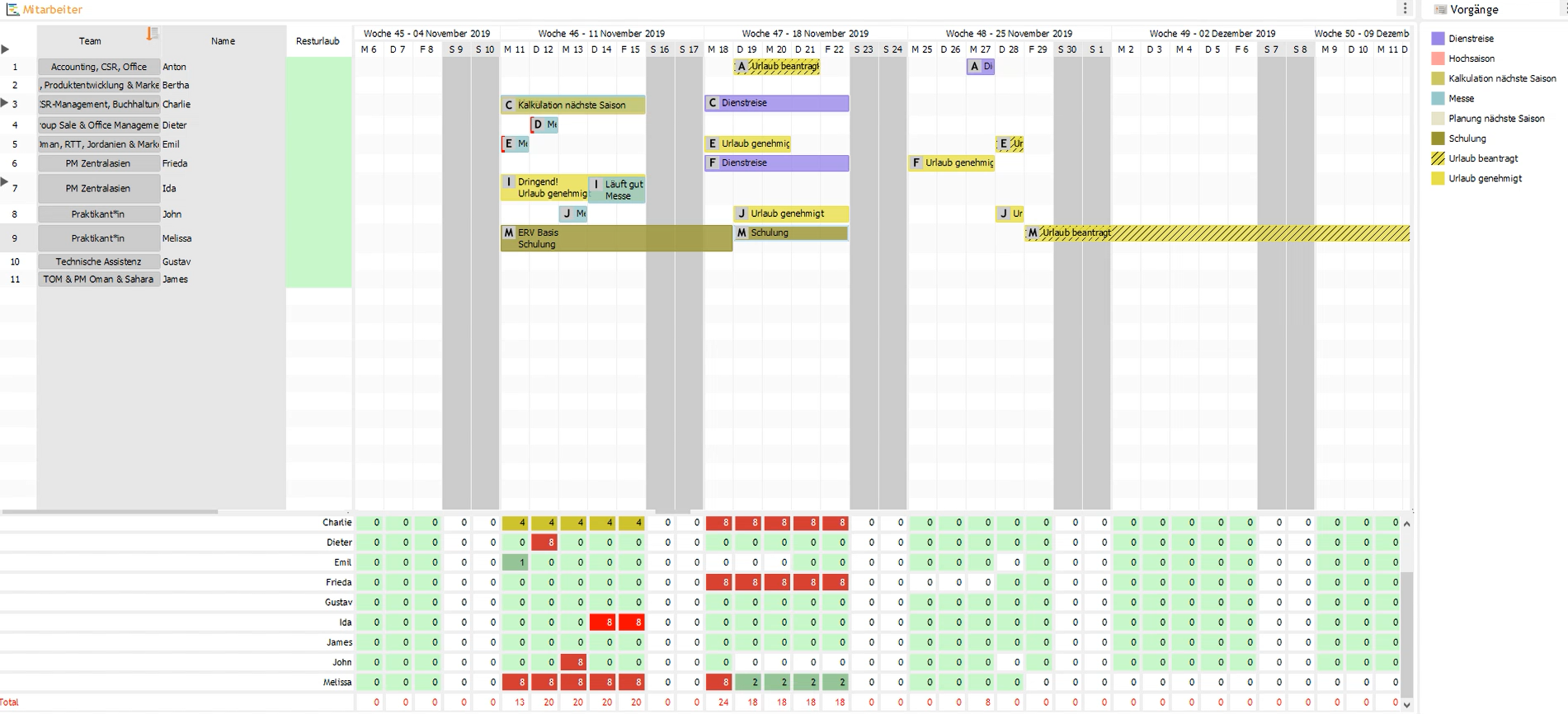
Centrally coordinate vehicles, drivers and assignments
Visual Planning® can display different types of vehicles, drivers, trailers, routes, transport orders and other mobile resources in a single overview.
Depending on the specific use case, information such as vehicle class, registration number, location, capacity, equipment or current status can be stored for each vehicle.
Drivers can be assigned to the relevant vehicles or routes according to their availability, qualifications and existing assignments.
Warnings and planning rules can indicate time overlaps, lack of availability or unsuitable resource combinations. The checks to be used are defined during configuration.
Changes are made available centrally to authorised users. This means there is no need to maintain multiple, differing vehicle and deployment lists.
Features for vehicle and fleet management
The software is configured in accordance with the vehicle types, operational processes and organisational requirements of the respective company.
Vehicle dispatching
Vehicles can be assigned to transport orders, routes, projects, locations or other assignments.
Driver planning
Drivers and mobile teams can be scheduled together, taking into account their availability and qualifications.
Availability
Existing assignments, absences, repairs and unavailability periods are taken into account in the planning.
Maintenance and testing
Maintenance, repairs and inspection dates can be displayed as appointments or periods of unavailability .
Capacity Overview
Vehicle allocations and available capacity can be displayed in various time views.
Reports and analyses
Capacity utilisation, deployment types, costs or other planning data can be analysed depending on the available information.
Different views for different planning tasks
Visual Planning® can provide daily, weekly, monthly and other views. The layout, scope of information and colours are adapted to the respective planning scenario.
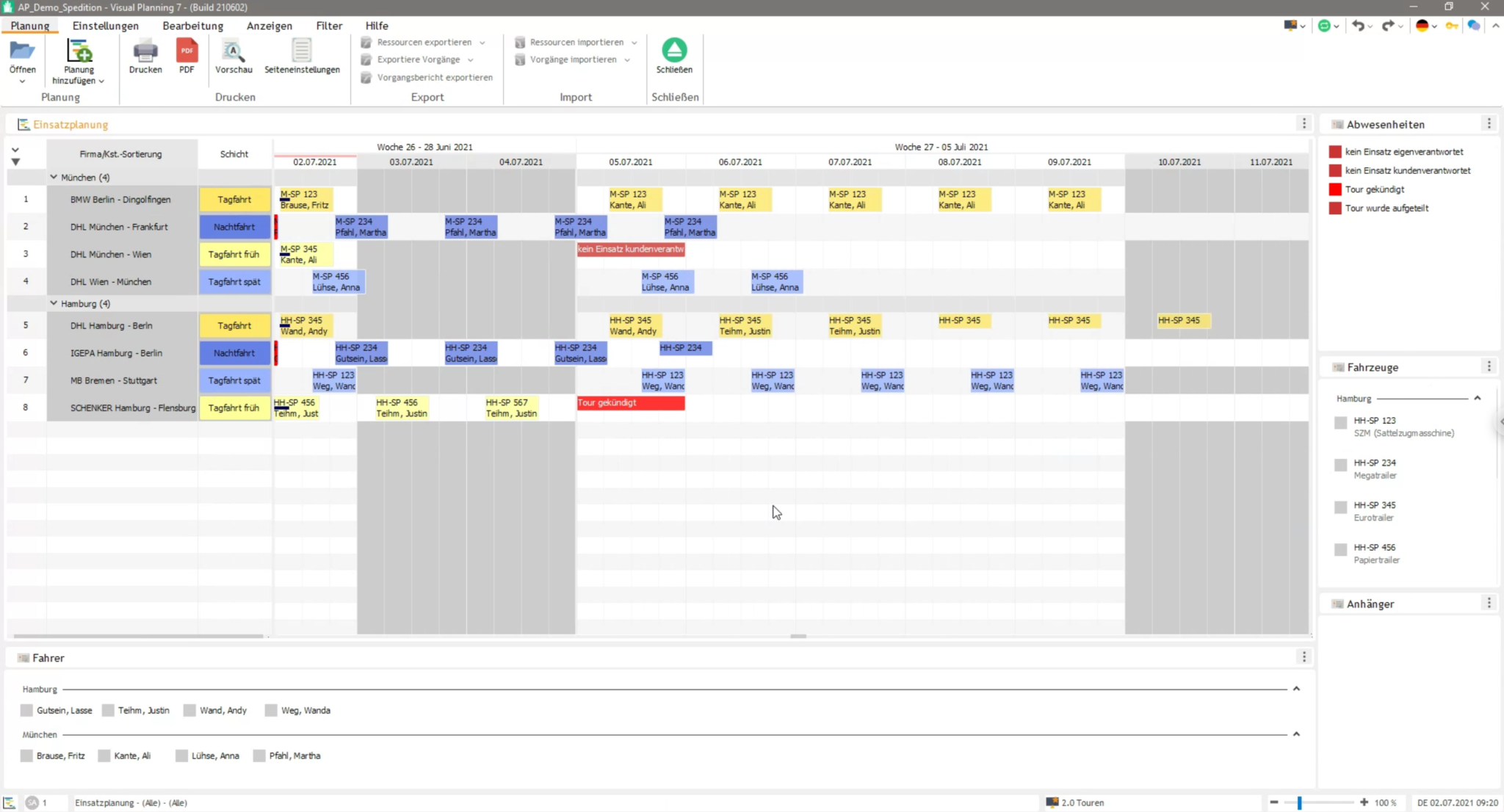
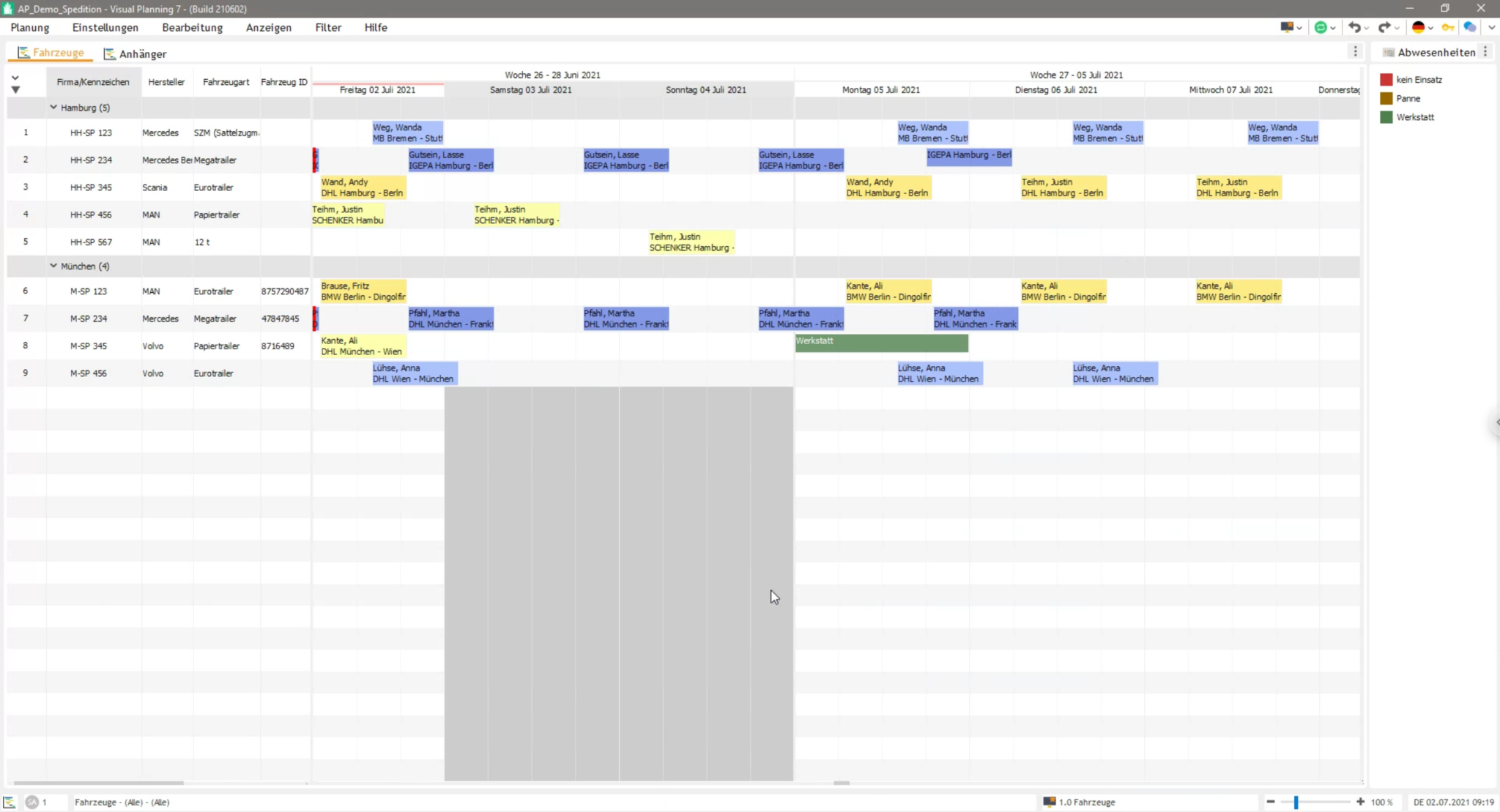
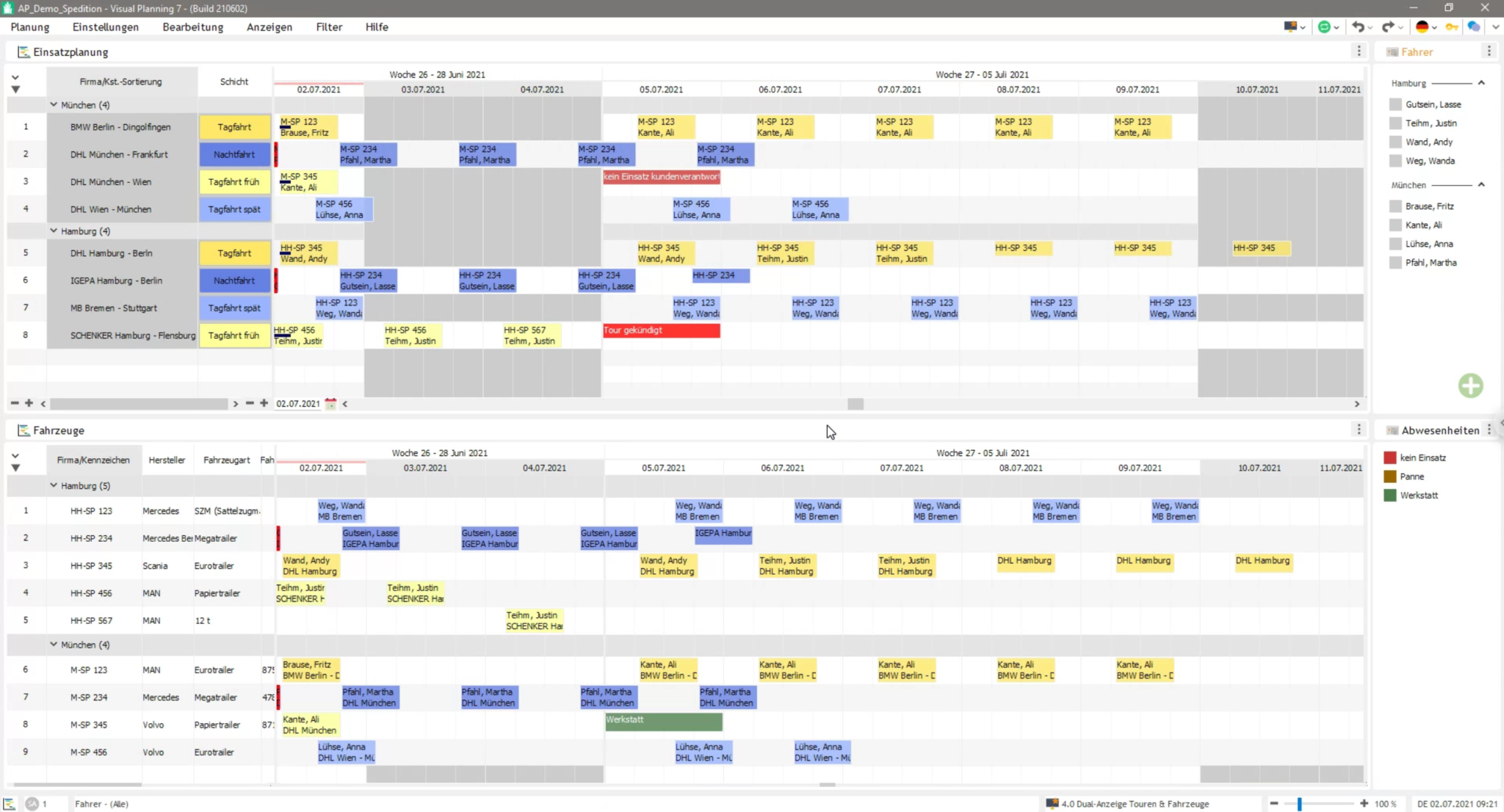
Typical planning tasks for vehicle fleets
- Vehicles and vehicle groups
- Trailers and other means of transport
- Drivers and mobile teams
- Routes and transport orders
- Customers and locations
- Day and night shifts
- Vehicle capacities
- Locations and vehicle fleets
- Maintenance and repairs
- Inspection and service appointments
- Driver absences
- Qualifications and authorisations
Flexibly accommodate last-minute changes
If a vehicle breaks down or a driver is unavailable, existing assignments can be adjusted in the central planning system.
Dispatchers can see which vehicles or drivers are available or already scheduled for other tasks at a specific time.
Jobs can be rescheduled, reprioritised or assigned to alternative resources. The impact on existing bookings is visible in the relevant view.
Visual Planning® does not automatically handle route optimisation or traffic management. Relevant data and functions can be integrated as required via suitable third-party systems and interfaces.
Browser-based and mobile access
Depending on the licence, system environment and configuration, shared planning information can be accessed via a web browser or on suitable mobile devices.
This enables drivers and other authorised users to access defined operational information whilst away from a fixed workstation.
Which information may be displayed or reported is governed by user rights and the relevant system configuration.
Integration into existing system landscapes
Vehicle, driver, customer or order data can be imported, depending on the specific project, from existing ERP, HR, telematics or fleet management systems.
Feedback and planning changes can also be transferred to third-party systems, provided that suitable interfaces are available.
The nature, direction and update frequency of the data exchange are defined during the requirements and interface analysis .
Frequently asked questions about digital fleet planning
What is digital fleet planning?
Digital fleet planning refers to the centralised planning and coordination of vehicles, drivers, routes, assignments, maintenance and available capacity using software.
What tasks does fleet planning involve?
This includes, amongst other things, vehicle dispatching, driver coordination, operational planning, scheduling, capacity overviews, as well as the consideration of maintenance and vehicle breakdowns.
Why is digital fleet planning important?
It provides transparency regarding vehicle allocation, available drivers and scheduled assignments. Changes and potential bottlenecks are thus identified more quickly.
How does digital fleet planning work?
Vehicles and drivers are assigned to routes, orders, projects or locations on a digital planning board. Authorised users can edit and update the schedule centrally.
What are the benefits of digital fleet planning?
It improves the overview of vehicles, drivers, appointments and capacities. Last-minute changes can be incorporated centrally into the planning process.
Why is Excel often not sufficient for complex fleet planning?
With a large number of vehicles, drivers and concurrent assignments, discrepancies in the spreadsheets can quickly arise. Availability, overlaps and changes must be checked and updated manually.
What are the disadvantages of fleet planning using Excel?
Changes often have to be made in several files . This can lead to version conflicts, transcription errors and incomplete information.
How can vehicles be scheduled efficiently?
Vehicles can be allocated to the relevant assignments based on their availability, capacity, equipment and current booking status.
How can double bookings for vehicles be identified?
Existing allocations and vehicle availability are displayed centrally. Configurable alerts can indicate time overlaps.
How can you identify capacity bottlenecks in your vehicle fleet?
Allocation and capacity views compare planned assignments with available vehicles. This makes potential bottlenecks visible right from the planning stage.
How does fleet planning support operational planning?
Vehicles, drivers, appointments and locations can be displayed together and co-ordinated.
How do you plan multiple vehicles and drivers at the same time?
Multiple vehicles, drivers, vehicle groups, locations or routes can be planned in parallel, either in combined or separate views .
How does digital fleet planning help with last-minute changes?
Vehicle breakdowns, staff absences, new orders or rescheduled appointments can be entered centrally and taken into account when rescheduling.
Does digital fleet planning automatically reduce empty runs?
The central deployment overview can help to better coordinate available vehicles and existing routes. However, automatic route or tour optimisation is only possible with appropriately configured functions or integrated third-party systems.
How does digital fleet planning support maintenance processes?
Maintenance, repairs and inspection dates can be entered as appointments or out-of-service periods, or imported via an interface from another system.
Can driver qualifications be taken into account?
Driving licence categories, training courses, certificates and other qualifications can be stored as employee attributes, depending on the configuration.
Can digital fleet planning be used on mobile devices?
Depending on the licence, configuration and system environment, shared planning information can be accessed via a web browser or on suitable mobile devices.
What are the benefits of a hosted fleet planning solution?
A hosted solution provides Visual Planning® in a centrally managed system environment. Access, data backup, responsibilities and possible interfaces depend on the chosen hosting model.
Which businesses would benefit from digital fleet planning?
It is suitable for logistics companies, craft businesses, construction firms, service organisations, car hire companies, freight forwarders and other businesses with multiple vehicles or mobile resources.
How does digital fleet planning improve transparency?
Vehicles, drivers, assignments, maintenance and availability are displayed in a centralised planning system. Authorised users can therefore work on the basis of a shared planning status.
How does digital fleet planning reduce planning errors?
Centralised data management, traceable changes, planning rules and transparent resource allocation overviews can help to reduce double bookings, data transfer errors and communication problems.
Try it for free now
Request a free trial.