

Workforce planning and staff scheduling with Visual Planning
Visual Planning® is configurable software for workforce planning and staff scheduling. Assign employees and teams to jobs, projects or shifts, taking qualifications, working hours, absences and available capacity into account on a shared digital planning board.
Workforce planning example: one job, suitable employees, available capacity
Simplified example with fictional people: A maintenance job requires a qualified electrician on Tuesday from 8 am to 4 pm. Three employees are potentially suitable. The scheduler compares qualifications, working calendars, absences and existing assignments.
| Staff | Qualifications | Current schedule | Decision |
|---|---|---|---|
| Anna | Qualified electrician | On leave on Tuesday | Do not schedule for this period |
| Ben | Qualified electrician | Already assigned from 8 am to noon | Resolve the overlap first |
| Clara | Qualified electrician | Available from 8 am to 4 pm | Assign to the job |
In Visual Planning®, you can filter by the relevant qualifications, compare existing bookings and assign Clara to the job. Working calendars and absences provide the basis for available capacity. Configured rules can flag or limit overlapping bookings; utilisation views compare planned work with available capacity.
If Clara becomes unavailable at short notice, check available employees and their existing assignments again. The person responsible decides on replacement staffing and rescheduling. The checks depend on maintained data and configured rules.
Explore workforce planning in a demo using your own example
When enquiring, describe your typical job, required qualifications and current planning problems. This allows us to discuss how the workflow could be represented in Visual Planning.
If an assignment also requires a vehicle or machine, explore shared resource planning. A documented application is described in the WALO Case Study on Staff and Stock Planning.
Staff deployment planning is a key success factor for companies with changing teams, shifts, projects or work locations. Visual Planning® helps planning managers to coordinate staff, skills, absences, tasks and available capacity in a centralised and clear manner.
Changes can be tracked directly on the digital planning board and, depending on the configuration, edited using drag-and-drop. This provides planning, project management and other authorised users with a common basis for their resource planning.
Benefits of staff deployment planning with Visual Planning®
- Centralised resource planning: Staff, teams, shifts, projects and tasks are displayed in a single planning view.
- Overview of availability: Working hours, absences and existing assignments can be taken into account during planning.
- Include qualifications: Skills, training, certificates or other employee attributes can be stored, depending on the configuration.
- Flexible rescheduling: Appointments and resource allocations can be adjusted in the event of cancellations, postponements or new requirements.
- Drag-and-drop: Employees can be clearly assigned to tasks, shifts, locations or projects.
- Configurable views: Daily, weekly, monthly and other time views can be configured according to the respective planning scenario.
- Warnings and planning rules: Double bookings, overlaps and lack of availability can be highlighted, depending on the defined rules .
- Reports and dashboards: Utilisation rates, capacities and other planning data can be displayed in configurable reports.
- User and access rights: Information and editing options can be restricted in line with the tasks of the respective users.
- Integration of existing systems: Depending on the specific project, data can be imported from or exported to third-party systems via interfaces.

Try Visual Planning® for free
Discover the possibilities of a customised staff deployment planning solution.
An overview of staff resource planning with Visual Planning®
The right person in the right place at the right time
The key question in staff deployment planning is: Which staff members and skills are required at what time, at which location or for which project ?
With multiple teams, locations, tasks and shifts, this coordination quickly becomes complex. In addition, absences, working time models, qualifications, training and other operational requirements must be taken into account.
Visual Planning® brings this information together in a configurable planning view. This enables planning managers to compare current allocations and available capacities.
Employees can be assigned to projects, tasks, shifts, locations or teams using drag-and-drop. The rules and checks that are automatically applied in this process are defined as part of the specific system configuration.
Changes to the schedule are made centrally and are available to authorised users. This means there is no need to maintain several different Excel files or versions of the duty roster .
A flexible tool for staff resource planning
Visual Planning® is configured in line with the organisation’s requirements. Fields, views, status indicators, colours, planning rules and reports can be adapted to the respective processes.
Depending on the area of application, it is possible to schedule, amongst other things, staff, teams, tasks, projects, positions, shifts, locations and other resources.
The graphical display makes it easier to identify bookings, free capacity and time overlaps. Assignments can be easily adjusted using drag-and-drop .
Qualifications, certifications, absences or working time information can be taken into account as planning criteria. Which data is managed or imported from other applications depends on the specific project.
Different timeframes and views enable detailed daily planning as well as a longer-term capacity or project overview.
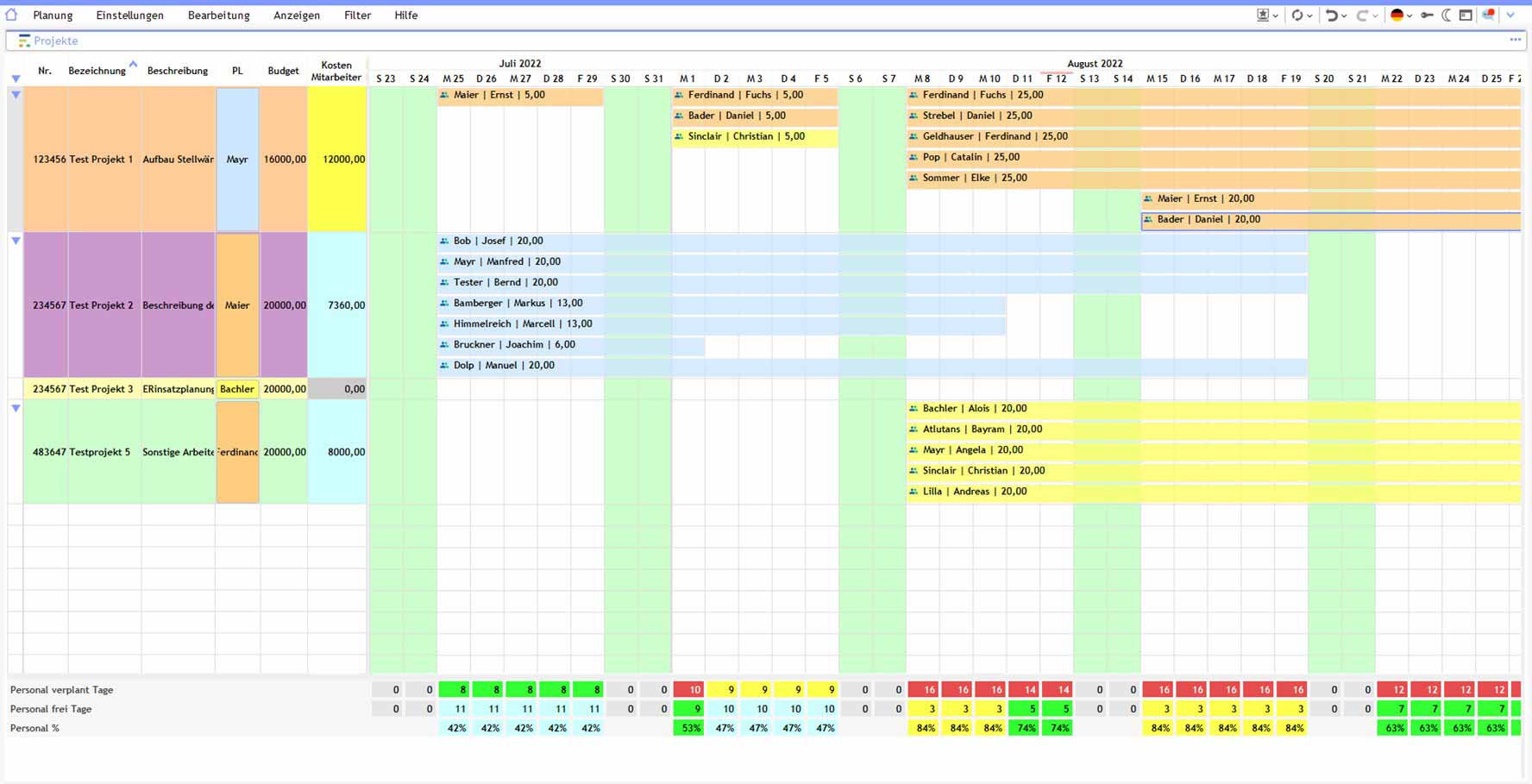
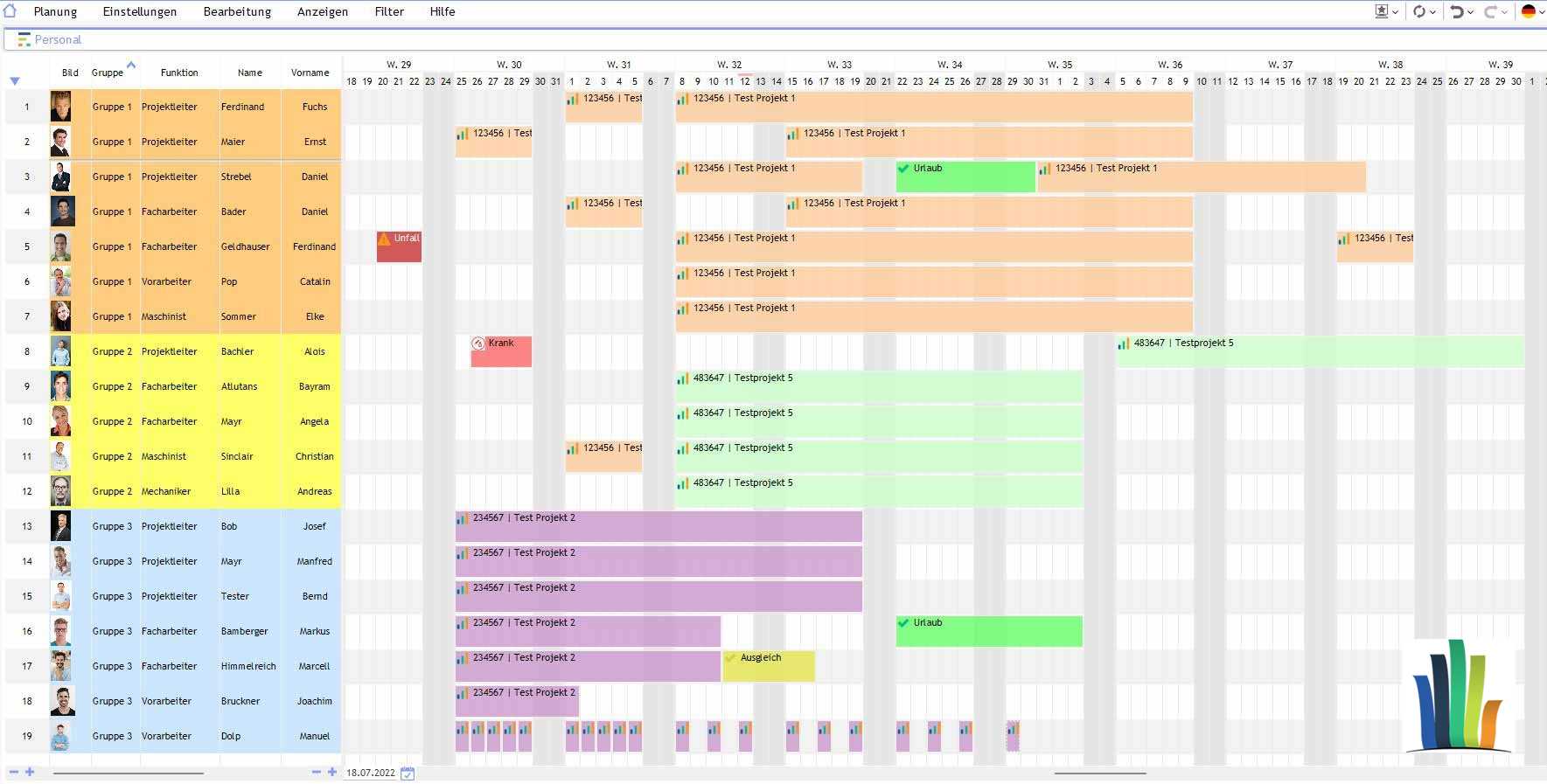
View staff, projects and capacities together
Planning managers can display relevant information such as working hours, absences, available capacity and existing assignments in a single overview.
Depending on the configuration, hourly, daily, weekly or monthly views can be used. This makes the software suitable both for short-term changes to deployment and for longer-term staff and capacity planning.
Capacity utilisation views help to identify free capacity and potential overloads. However, they are no substitute for the professional judgement of the relevant planning managers.
Planning views can be structured depending on the desired perspective. For example, employees can be displayed in the rows and projects in the columns, or vice versa.
Visual Planning® can be deployed as an on-premises installation or in a hosted system environment. The appropriate operating and licensing model depends on the technical and organisational requirements.
Staff scheduling in the browser and on mobile devices
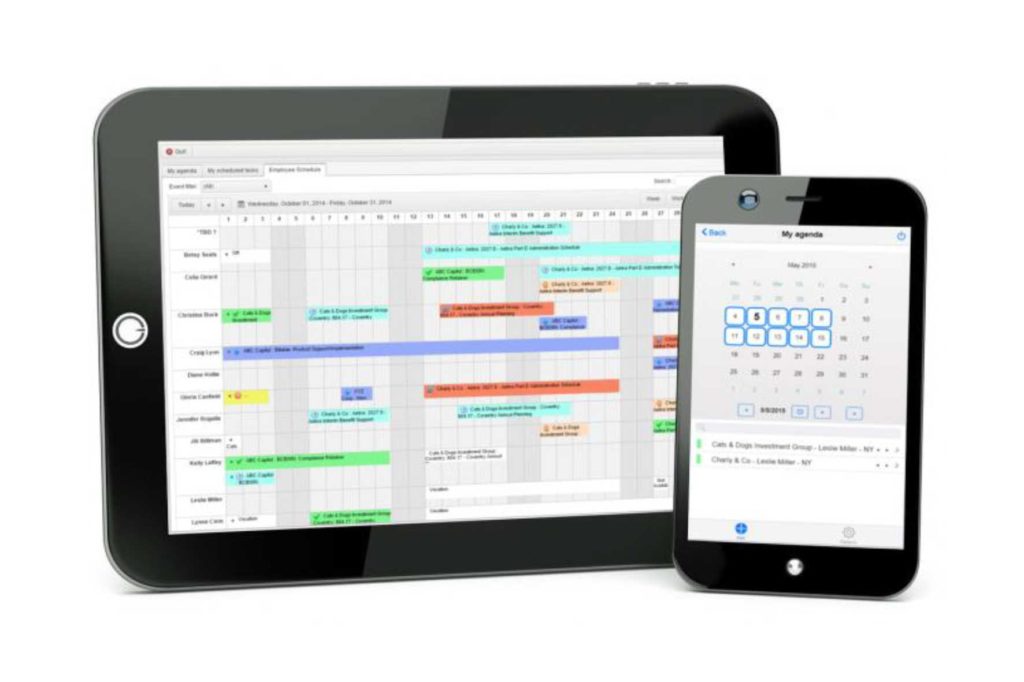
Visual Planning® supports collaborative work between multiple authorised users. Which employees are permitted to view or edit specific information is governed by user and access rights.
With VPPortal Approved planning information can be made available via a web browser.
About VPGo Selected information and functions can be accessed on suitable mobile devices, depending on the licence, configuration and system environment.
This enables employees, team leaders and other authorised users to access approved assignment information or enter defined feedback even when away from a fixed workstation.
Whether a function is available online or offline depends on the component used and the respective configuration.
Shop floor management and staff scheduling
In shop floor management, tasks, shifts, teams, machines and production areas must be coordinated with one another. A digital planning board provides a shared visual basis for this operational coordination.
Visual Planning® can bring together staff and tasks in configurable overviews. Status information, capacities, deadlines and other key figures can be displayed depending on the available data.
This provides team and shift managers with a clear overview of planned assignments. Changes and deviations can be recorded centrally and tracked by authorised users.
Which key figures and planning information are relevant for the respective shop floor management is determined as part of the requirements analysis and configuration.
Further information can be found on the page Shop floor management .
Frequently asked questions about workforce planning and implementation
What can Visual Planning workforce planning software do?
You can assign employees and teams to jobs, projects, shifts or locations and view their bookings on a shared planning board. Qualifications, availability, absences and capacities are considered according to your data model. Visual Planning is configured for this; the functions available depend on the setup and modules selected.
What data is needed for workforce planning?
For an initial planning area, you need employees and teams, working calendars, absences, relevant qualifications, and jobs or tasks with time periods and staffing requirements. Also define who maintains the data and who may schedule work. Existing Excel lists or data from HR and ERP systems can be transferred through configured imports or project-specific interfaces after reviewing the data structure.
How is Visual Planning implemented for staff scheduling?
A clearly defined planning area is a sensible starting point. First clarify workflows, data sources, responsibilities and requirements. Then configure fields, views, calendars, user permissions and conflict rules, and test them with representative assignments. The responsible users trial the workflow before adding more teams or locations. Effort and timescale depend on data quality, interfaces and scope.
What does digital staff scheduling cover?
Employees and teams are assigned to tasks, shifts, projects and locations. Working hours, availability, absences and qualifications provide the basis. Authorised users work with a shared planning state.
When does Excel reach its limits in staff scheduling?
With many employees, parallel projects and frequent changes, multiple spreadsheet versions need to be reconciled. A central planning board can reduce this coordination effort. Selection criteria can be found in the comparison of Visual Planning and Excel.
How are qualifications and work locations taken into account?
Employees can be filtered by maintained qualifications, authorisations, location and availability, and assigned to suitable jobs. The attributes checked depend on the configured data model and scheduling rules.
How does Visual Planning® support shift planning?
Shifts can be represented as time periods or appointments and assigned to employees or teams. Working time and shift rules are configured according to operational requirements.
How are multiple teams and locations scheduled?
Teams, departments and locations can be displayed in shared or linked views. Filters and user permissions determine which staff assignments each scheduler can see and edit.
How can leave and other absences be taken into account?
Leave, sickness and other absences can be recorded as appointments or availability attributes, or transferred through a suitable interface. Working calendars and absence data must be kept up to date.
How is a replacement scheduled when someone calls in sick?
The scheduler checks available employees with suitable qualifications and takes their existing assignments into account. Authorised users adjust the assignment; automatic replacement staffing is not generally guaranteed.
How are available staff hours and overloads made visible?
Working calendars, absences and planned assignments provide the basis for utilisation views. Calculations and warnings are configured. The software does not automatically reduce overtime; distributing and approving work remains the responsibility of those in charge.
Can employees access their assignments on mobile devices?
Depending on the licence, configuration and system environment, authorised assignments can be made available through VPPortal in a browser or VPGo on suitable mobile devices. User permissions limit access and editing.
When are resources beyond employees needed?
If an assignment also needs machines, vehicles or equipment, their availability must align. Cross-resource conflict checks, capacity calculations and rescheduling are described in operational resource planning.
Try the demo version of the Try the Visual Planning staff planning software for free!
We actively support you in finding a tailored software solution for staff deployment planning.
Staff deployment planning for construction, manufacturing and technical services
Requirements vary depending on the area of application. In the construction sector, staff and work teams are allocated to different building sites, equipment and deadlines. In manufacturing, shifts, skills and machine utilisation must be coordinated. In technical services, customer time slots, travel routes, on-call duties and experience with the equipment must also be taken into account.
Further information can be found in the Construction site planning, which Detailed planning in production and the Maintenance and repair planning. The case studies from WALO, HOMAG and GROB.